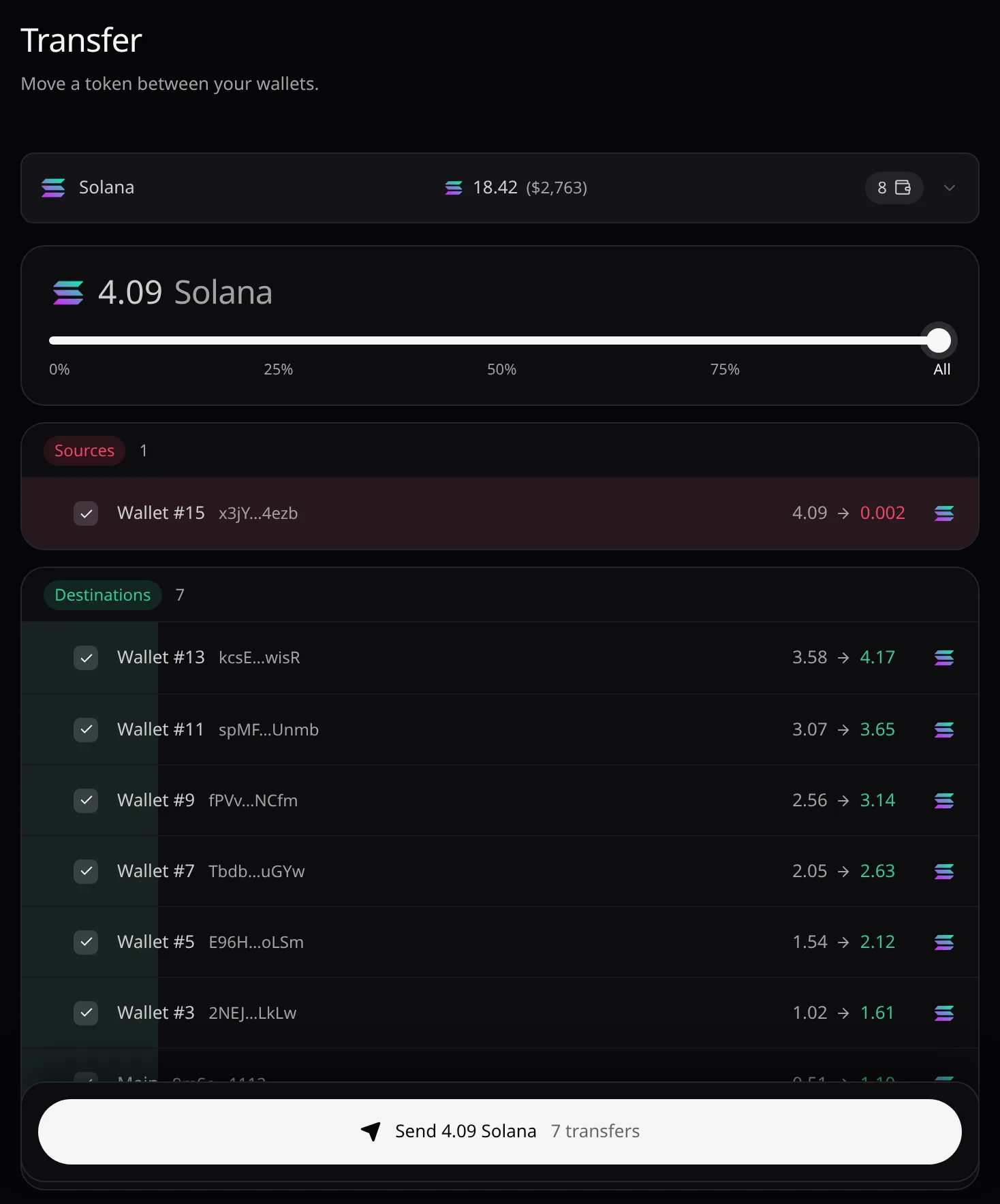
Transfer
Move one token between your own wallets: choose the sources, the share each one sends, and the destinations.
Open Transfer from the sidebar’s Wallet group, Portfolio or the Dashboard. You need a key with Can withdraw or higher. To send outside Pace, use Withdraw.
Choose the token
Search by name, ticker or contract address. Only tokens you hold are listed, most valuable first.
Arrange the wallets
Drag wallets between Sources and Destinations, or hover a row and use its arrow. Click a row to leave it out. Add more wallets creates up to 50 new destinations at once.
Who can send
Only wallets Pace generated, and that hold the token, can send; an imported wallet can only receive. Moving a token other than the chain’s coin costs each source a fee in that coin; a wallet without it is marked No {NATIVE} for fees. A destination with none of that coin gets a small amount, so it can move the token later.
Set the share
Share of each source sets how much of each source’s balance it sends. The total is split evenly between the destinations.
Send
Check the balances after the move, then choose Send {amount} {symbol}. Email and passkey sign-ins confirm once for the whole run. If some transfers fail, Retry failed sends only those again.
Error messages are listed in Troubleshooting.