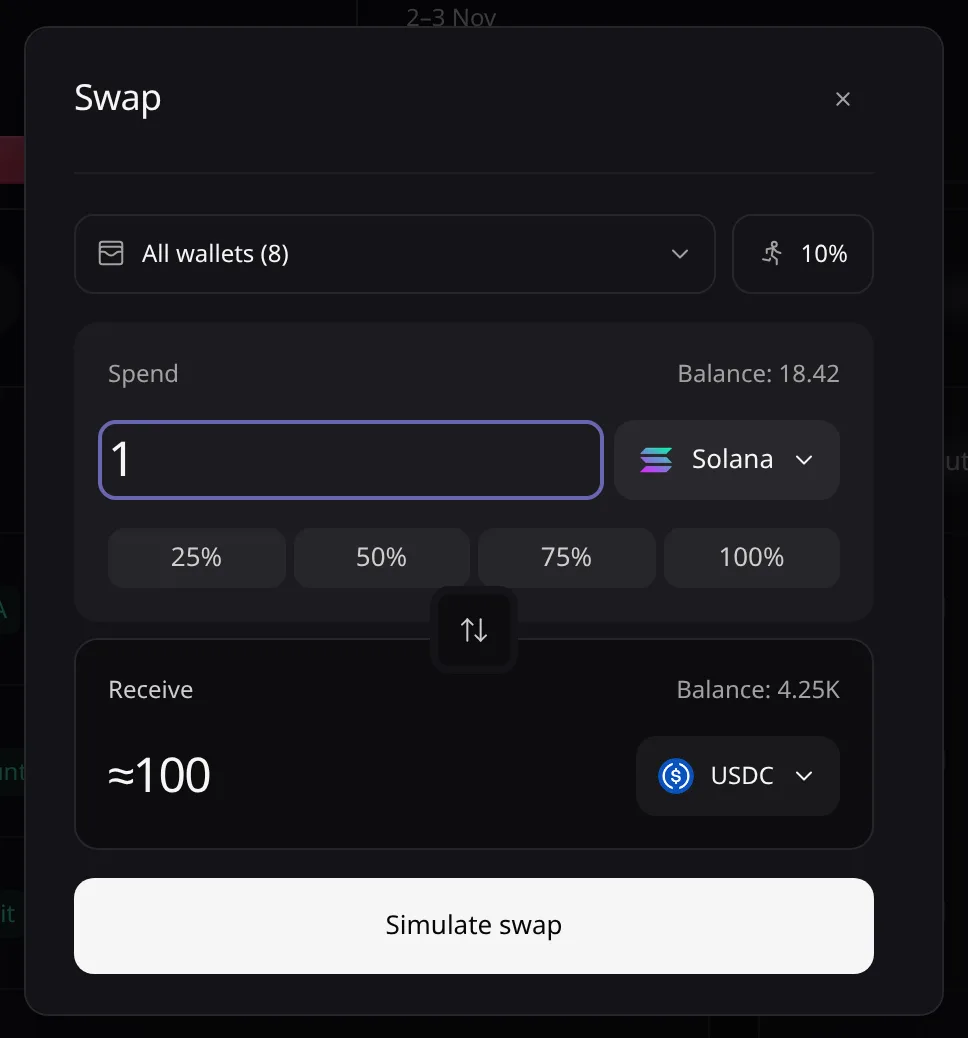
Swap
Swap tokens from your wallets or your pooled balance, with a slippage limit and Pace's safety checks.
Open Swap from the sidebar’s Wallet group, the Dashboard, Portfolio or a holding’s Swap. You need a key with Can trade or higher.
Choose the wallets
Tick All wallets, some of them, or Pooled balance; the two do not mix. With several wallets, Pace splits the amount in proportion to their balances.
Pick the assets
Choose the asset chip of Spend or Receive and search, or paste a contract address and choose Use this asset. The arrow between the fields switches direction.
Enter the amount
Type it, or choose 25% to 100% of the balance.
Max slippage
The chip beside the wallets sets how far the price may move before the swap is refused. It is not a fee. Pick 10% (the default), 25%, 50% or a custom value. Your choice is kept in this browser, and a new strategy starts from it.
Read the quote and swap
Read Receive and any warning under it, then choose Swap. The receipt reads Swap sent, with a link to the explorer.
Safety limits
Pace checks each quote before you click. It refuses a swap that loses too much against the market price, moves a pool too far, uses a pool that is too thin or off the market, or cannot be priced. The breach shows under Receive, and the swap reads Refused.
The Trade tab of a token page is the same swap in a compact form.
Error messages are listed in Troubleshooting.